
In the fast-paced world of industrial operations, maintenance is a critical function that keeps production lines humming and equipment running smoothly. However, managing maintenance tasks efficiently across multiple locations, especially with distributed teams, can be a daunting challenge. This is where CMMS Software for Managing Maintenance from Anywhere comes into play, revolutionizing how businesses handle their maintenance operations. In this comprehensive guide, we’ll explore what CMMS software is, its key features, benefits, and how it empowers maintenance teams to work smarter, not harder.
I. What is CMMS Software?
A Computerized Maintenance Management System (CMMS) is a digital platform designed to streamline and optimize maintenance operations. Unlike traditional paper-based or localized systems, modern CMMS software operates in the cloud, enabling maintenance teams to manage maintenance from anywhere with an internet connection. It serves as a centralized hub for organizing, scheduling, tracking, and analyzing all maintenance-related activities, from work orders to asset management.
At its core, CMMS software replaces outdated methods like spreadsheets, sticky notes, or manual logs, which are prone to errors and inefficiencies. By leveraging cloud-based technology, it ensures real-time access to critical data, allowing technicians, supervisors, and managers to stay connected and make informed decisions on the go.
II. Why Cloud-Based CMMS is a Game-Changer
Cloud-based CMMS software eliminates the need for on-premises servers or complex IT infrastructure. This accessibility makes it an ideal solution for businesses with multiple facilities or remote teams. Whether you’re on the factory floor, at a remote site, or working from home, a cloud-based CMMS ensures you can manage maintenance from anywhere, improving operational efficiency and reducing downtime.
III. Key Features of CMMS Software for Managing Maintenance from Anywhere
To understand why CMMS software is so effective, let’s dive into its core features that empower maintenance teams to operate seamlessly, no matter their location.
1. Cloud Accessibility for Seamless Operations
Access your maintenance system from any device—smartphone, tablet, or laptop—as long as you have an internet connection. This feature ensures that critical maintenance data is always at your fingertips, enabling you to manage maintenance from anywhere.
2. Real-Time Data Syncing
With real-time updates, all team members see the same information simultaneously. Whether a technician updates a work order or a manager reviews a report, changes are reflected instantly across the system, ensuring everyone stays on the same page.
3. Work Order Management
Create, assign, and track work orders effortlessly. Technicians can view detailed instructions, update task statuses, and attach photos or notes, all from their mobile devices, streamlining workflows and reducing delays.
4. Asset Tracking and Management
Monitor equipment details, including service history, manuals, and performance metrics. This feature helps teams anticipate maintenance needs and extend asset lifespans.
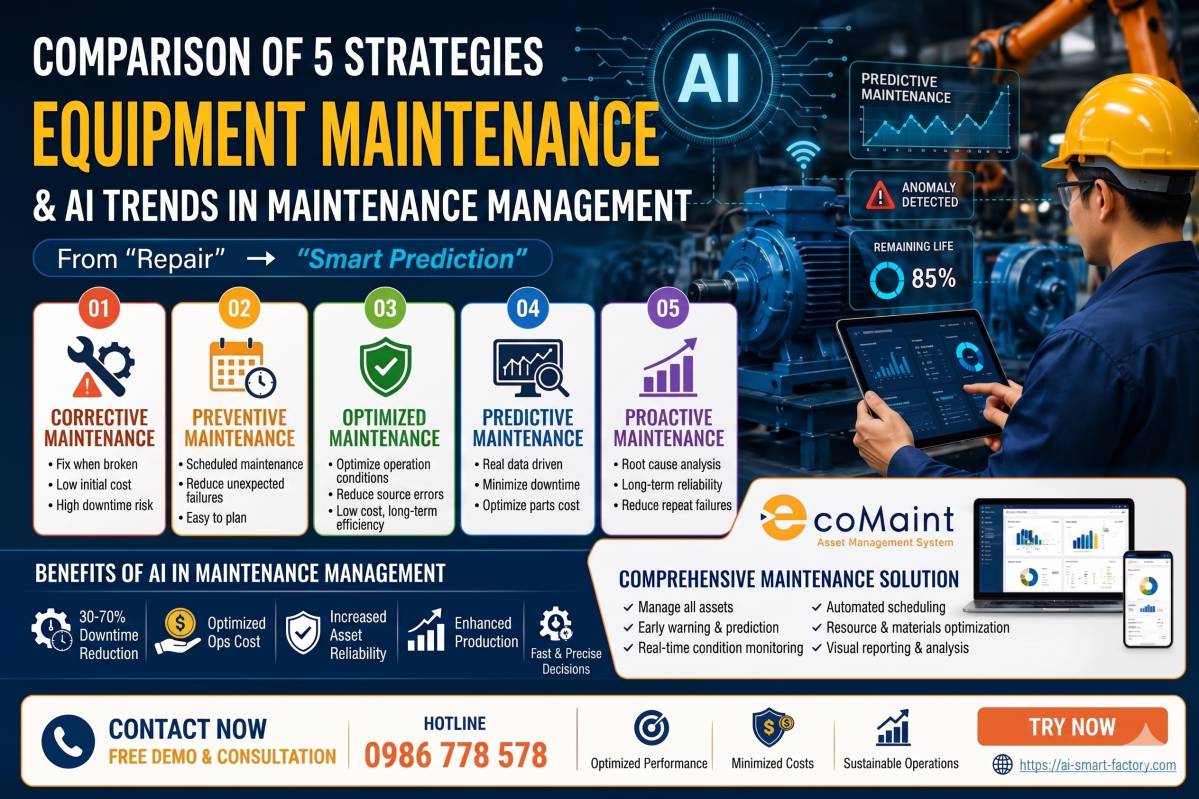
5. Preventive Maintenance Scheduling
Automate maintenance schedules based on time, usage, or equipment condition. This proactive approach minimizes unexpected breakdowns and ensures assets are serviced before issues arise.
6. Inventory and Spare Parts Management
Track spare parts inventory in real time, receive low-stock alerts, and reorder supplies before they run out. This ensures repairs are completed without delays due to missing parts.
7. Warranty and Compliance Management
Store warranty details and compliance records in one place. Easily retrieve documentation during audits or inspections to ensure regulatory compliance.
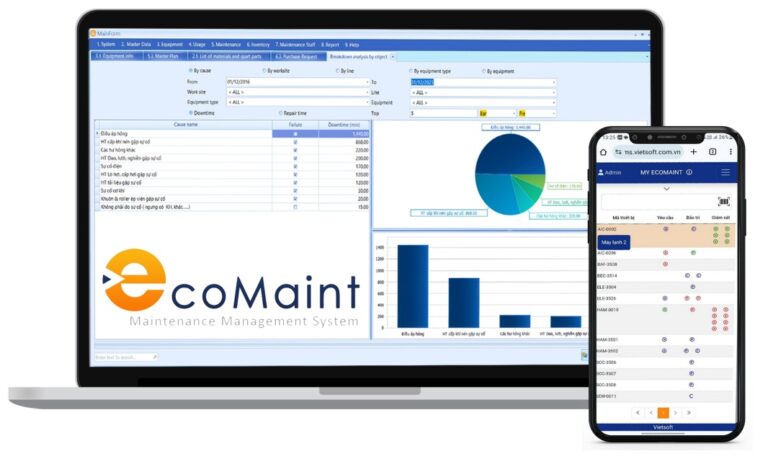
8. Advanced Reporting and Analytics
Generate detailed reports on key performance indicators (KPIs) like downtime, repair costs, and technician productivity. These insights help managers make data-driven decisions to optimize maintenance strategies.
9. Mobile Accessibility
With mobile apps, technicians can manage maintenance from anywhere, accessing work orders, manuals, and inventory data on the go. Offline functionality ensures work continues even in areas with poor connectivity.
10. Data Security and Backups
Cloud-based CMMS software employs robust encryption and automatic backups to protect sensitive data, ensuring peace of mind for businesses handling critical maintenance information.
III. Benefits of Using CMMS Software to Manage Maintenance from Anywhere
Implementing a CMMS solution offers tangible benefits that transform maintenance operations. Here’s how it impacts your team’s daily work and your organization’s bottom line.
1. Enhanced Accessibility for Distributed Teams
With CMMS Software for Managing Maintenance from Anywhere, teams can access critical data from any location. For example, a technician at a remote site can check a machine’s service history, while a manager in the office reviews real-time progress, ensuring seamless collaboration.
2. Reduced Equipment Downtime
By automating preventive maintenance schedules, CMMS software ensures assets are serviced before they fail. For instance, if a pump requires lubrication every 500 hours, the system sends alerts to technicians, preventing costly breakdowns.
3. Streamlined Work Order Processes
Work orders are created, assigned, and tracked in one platform, eliminating lost requests or miscommunication. Technicians receive instant notifications on their mobile devices, reducing response times and improving efficiency.
4. Optimized Inventory Management
Running out of spare parts can halt repairs and increase downtime. CMMS software tracks inventory levels and sends reorder alerts, ensuring parts are always available when needed.
5. Cost Savings Through Proactive Maintenance
Preventive maintenance reduces emergency repairs, which can be up to 5-10 times more expensive than planned maintenance. By addressing issues early, businesses save on repair costs and avoid production losses.
6. Simplified Compliance and Audits
CMMS software stores maintenance logs, safety records, and compliance documents in a searchable database. During audits, managers can quickly retrieve records, ensuring compliance with standards like ISO 9001 or OSHA regulations.
7. Data-Driven Decision Making
Detailed analytics provide insights into maintenance trends, such as which assets require frequent repairs or where costs are highest. This data helps managers allocate resources efficiently and plan long-term investments.
8. Improved Team Collaboration
With real-time updates and centralized communication, teams stay aligned. For example, a technician can report an issue, attach a photo, and notify the supervisor instantly, speeding up decision-making.
IV. Common Maintenance Challenges and How CMMS Software Solves Them
Maintenance teams often face recurring challenges that disrupt operations. Here’s how CMMS Software for Managing Maintenance from Anywhere addresses these pain points.
1. Challenge 1: Disorganized Work Orders
Manual systems like emails or paper notes lead to lost or forgotten work orders, delaying repairs.
Solution: CMMS software centralizes work orders in a digital platform, ensuring tasks are assigned, tracked, and completed on time. Managers can monitor progress in real time, reducing oversights.
2. Challenge 2: Unexpected Equipment Failures
Unplanned downtime can cost businesses thousands of dollars per hour, especially in industries like manufacturing.
Solution: Automated preventive maintenance schedules ensure assets are serviced before they fail, reducing downtime by up to 30%, as seen in industries using CMMS solutions.
3. Challenge 3: Inefficient Inventory Management
Running out of critical spare parts delays repairs and frustrates technicians.
Solution: CMMS software tracks inventory in real time, sending alerts when stock levels are low. This ensures parts are available, minimizing repair delays.
4. Challenge 4: Compliance and Record-Keeping Issues
Manual record-keeping is time-consuming and error-prone, complicating audits and inspections.
Solution: CMMS software stores all maintenance records digitally, making it easy to retrieve logs for audits or compliance checks, saving hours of manual work.
5. Challenge 5: Limited Visibility for Managers
Without clear data, managers struggle to identify inefficiencies or allocate resources effectively.
Solution: CMMS software provides dashboards and reports that highlight KPIs, such as technician productivity or asset performance, enabling smarter decision-making.
V. Why Mobile Accessibility is Critical for Modern Maintenance
Mobile accessibility is a cornerstone of CMMS Software for Managing Maintenance from Anywhere. With mobile apps, technicians can access critical data, update work orders, and communicate with teams from any location, whether on the shop floor or at a remote facility.
Key Benefits of Mobile CMMS
- Real-Time Work Order Management: Technicians can view, update, and close work orders on their smartphones, reducing response times.
- Offline Functionality: Work continues in areas with no internet, with data syncing automatically once connectivity is restored.
- Instant Documentation Access: Retrieve manuals, safety protocols, or service histories instantly, minimizing errors.
- QR/Barcode Scanning: Scan asset tags to pull up maintenance history or create work orders, saving time.
- Improved Communication: Share updates, photos, or videos with teams in real time, enhancing collaboration.
VI. Best Practices for Implementing CMMS Software
To maximize the benefits of CMMS Software for Managing Maintenance from Anywhere, follow these best practices:
· Define Clear Objectives: Identify your maintenance goals, such as reducing downtime or improving compliance, to guide your CMMS implementation.
· Train Your Team: Provide comprehensive training to ensure technicians and managers can use the system effectively.
· Start Small: Begin with core features like work order management and gradually expand to inventory or analytics.
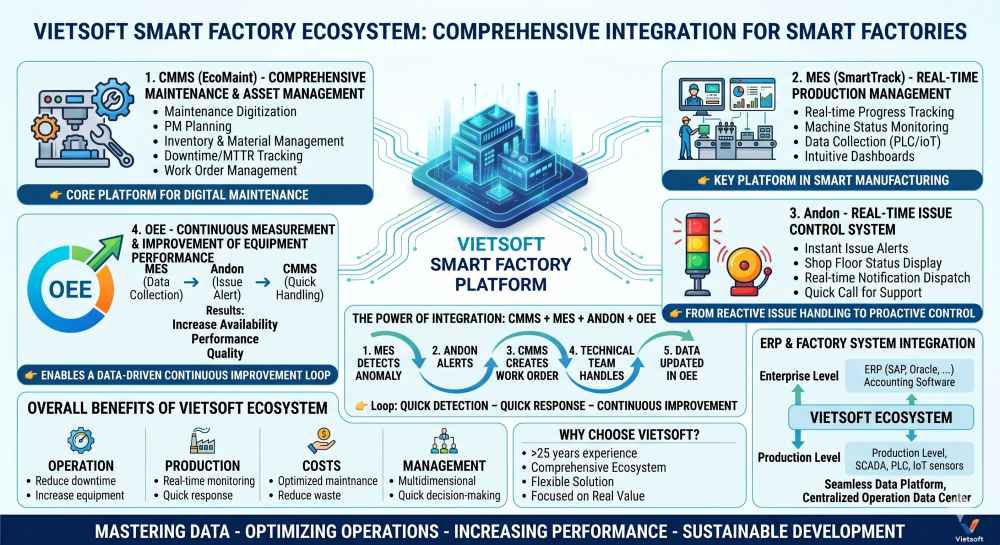
· Integrate with Existing Systems: Ensure your CMMS integrates with ERP or IoT systems for seamless data flow.
· Monitor and Optimize: Regularly review analytics to identify areas for improvement and refine your maintenance strategy.
VII. Introducing CMMS EcoMaint by Vietsoft: Your Partner in Maintenance Excellence
For businesses in Vietnam seeking a reliable and user-friendly solution to manage maintenance from anywhere, CMMS EcoMaint by Vietsoft offers a powerful platform tailored to the needs of modern maintenance teams. Designed with input from industry experts, EcoMaint combines cutting-edge technology with practical features to streamline maintenance operations.
Why Choose CMMS EcoMaint?
- Localized Expertise: Built with an understanding of Vietnam’s industrial landscape, EcoMaint addresses the unique challenges faced by local businesses.
- User-Friendly Interface: Intuitive design ensures quick adoption by technicians and managers, minimizing training time.
- Scalable Solution: Whether you manage a single facility or multiple sites, EcoMaint grows with your business.
- Comprehensive Support: Vietsoft’s dedicated support team provides fast, reliable assistance to keep your operations running smoothly.
EcoMaint empowers businesses to reduce downtime, optimize asset performance, and achieve cost savings through proactive maintenance. Curious to see how it works?
VIII. Case Study: Real-World Impact of CMMS Software
Consider a mid-sized manufacturing plant in Vietnam with 50 machines across two facilities. Before adopting CMMS software, the maintenance team relied on spreadsheets and phone calls, leading to frequent miscommunication and downtime. After implementing CMMS EcoMaint, the plant saw remarkable improvements:
- 30% Reduction in Downtime: Automated preventive maintenance schedules ensured machines were serviced on time.
- 20% Decrease in Repair Costs: Proactive maintenance reduced emergency repairs.
- 15% Increase in Asset Lifespan: Regular upkeep extended the life of critical equipment.
- Improved Team Productivity: Technicians saved hours daily by accessing work orders and inventory data on their mobile devices.
This highlights how CMMS Software for Managing Maintenance from Anywhere delivers measurable results, making it an essential tool for modern businesses. Learn more about CMMS EcoMaint here.
Contact us via hotline: 0986778578 or email: sales@vietsoft.com.vn.
IX. Conclusion: Transform Your Maintenance Operations with CMMS Software
Managing maintenance in today’s complex industrial landscape doesn’t have to be a struggle. With CMMS Software for Managing Maintenance from Anywhere, businesses can streamline operations, reduce downtime, and empower teams to work efficiently from any location. By leveraging cloud-based technology, mobile accessibility, and powerful analytics, CMMS software transforms maintenance into a strategic advantage.