
Today, the debate between Cloud-Based CMMS and On-Premise CMMS is more relevant than ever, especially as businesses strive to balance cost, efficiency, and scalability. This comprehensive guide dives deep into these two deployment models, offering actionable insights for maintenance professionals and technical teams. Whether you’re managing a small facility or a multi-site operation, understanding the nuances of Cloud-Based CMMS versus On-Premise CMMS can help you make an informed decision that aligns with your goals.
Let’s explore the concepts, benefits, challenges, and practical considerations to empower your maintenance strategy.
I. What is Cloud-Based CMMS?
Cloud-Based CMMS refers to a maintenance management system hosted on remote servers managed by a third-party provider, accessible via the internet through web browsers or mobile apps. This Software-as-a-Service (SaaS) model eliminates the need for on-site infrastructure, allowing businesses to subscribe to the service on a monthly or annual basis. For maintenance teams, this means instant access to tools for work order management, asset tracking, and preventive maintenance scheduling without the burden of hardware setup.
From my experience in Vietnam’s industrial sector, Cloud-Based CMMS has gained traction due to its flexibility. For instance, a technician in a remote factory can log equipment issues using a tablet, while a manager in Hanoi reviews the data in real-time. The system’s reliance on cloud technology ensures data is stored securely off-site, often with automatic backups, making it a lifeline for operations in flood-prone areas where local servers might fail.
II. What is On-Premise CMMS?
On-Premise CMMS, on the other hand, is installed and operated on a company’s internal servers. This deployment requires a significant upfront investment in hardware, software licenses, and IT infrastructure. Once set up, it runs on the organization’s local network, giving complete control over data and security. Businesses typically pay a one-time fee for a perpetual license, though ongoing maintenance costs can accumulate.
In my work with Vietnamese manufacturers, On-Premise CMMS has been favored by companies in regulated industries like pharmaceuticals, where data sovereignty is non-negotiable. For example, a plant producing medical devices might opt for this model to comply with strict government standards, keeping all data within its walls. However, this approach demands a robust in-house IT team to manage updates and security, which can be a challenge for smaller firms.
III. Key Differences Between Cloud-Based CMMS and On-Premise CMMS
The choice between Cloud-Based CMMS and On-Premise CMMS hinges on several critical factors. Here’s a detailed breakdown to guide your decision:
1. Cost Structure
- Cloud-Based CMMS: Operates on a subscription model, typically ranging from $30 to $100 per user per month, depending on features. For a team of 10, this might total $3,600 annually, with no upfront hardware costs. This operating expense (OpEx) approach spreads costs over time, ideal for budgeting.
- On-Premise CMMS: Involves a capital expenditure (CapEx) of $20,000 to $50,000 for servers, licenses, and installation, plus ongoing costs for maintenance (e.g., $5,000 yearly). Over 5 years, a company might spend $75,000, but the initial outlay can strain cash flow.
2. Security and Data Control
- Cloud-Based CMMS: Security is managed by the provider, often with encryption and compliance to standards like ISO 27001. However, data resides off-site, raising concerns for industries with strict privacy laws.
- On-Premise CMMS: Offers full data control, with security protocols tailored to the company’s needs. Yet, it relies on internal teams to patch vulnerabilities, which can be risky if expertise is limited.
3. Scalability
- Cloud-Based CMMS: Scales effortlessly—adding users or assets requires a subscription upgrade, often within days. A growing factory can expand from 50 to 200 assets with minimal disruption.
- On-Premise CMMS: Scaling demands new hardware and reconfiguration, potentially taking weeks and costing thousands. This rigidity can hinder growth for dynamic operations.
4. Accessibility
- Cloud-Based CMMS: Enables access from any internet-connected device, perfect for field technicians in Vietnam’s rural provinces. Mobile apps often include offline modes for connectivity challenges.
- On-Premise CMMS: Limits access to the local network, requiring VPNs for remote work. This can slow down teams spread across multiple sites.
5. Implementation and Maintenance
- Cloud-Based CMMS: Deploys in days with vendor support, requiring no internal IT effort. Updates are automatic, ensuring constant improvement.
- On-Premise CMMS: Takes weeks or months to install, with manual updates that may cause downtime. IT teams must handle troubleshooting and upgrades.
IV. Advantages of Cloud-Based CMMS
As a maintenance expert, I’ve seen Cloud-Based CMMS revolutionize operations, especially in Vietnam’s diverse industrial landscape. Here’s why it stands out:
1. Remote Accessibility
Technicians can update work orders from a construction site in Da Nang using a smartphone, while managers in Ho Chi Minh City monitor progress. This real-time collaboration boosts productivity by 20-30%, based on industry studies.
2. Lower Initial Costs
A small workshop avoids spending $25,000 on servers, opting instead for a $50/month subscription per user. This lowers the entry barrier for SMEs, a key trend in Vietnam’s growing market.
3. Fast Deployment
Implementation can take as little as a week, allowing a factory to start tracking assets immediately. This speed is critical during unexpected equipment failures.
4. Automatic Updates
Providers roll out new features—like predictive maintenance tools—without downtime.
5. Scalability
A manufacturer can expand machines by upgrading its plan, avoiding hardware costs. This flexibility supports Vietnam’s rapid industrialization.
6. Managed Security
With encryption and multi-factor authentication, a cloud provider ensures data safety, even during cyberattacks—a concern for manufacturers handling sensitive designs.
7. Data Backup
Automatic backups across multiple locations, showcasing resilience unavailable with local servers.
8. Seamless Integration
Integration with IoT sensors and ERP systems streamlines workflows, maintenance data synced with production schedules.
V. Disadvantages of Cloud-Based CMMS
Despite its benefits, Cloud-Based CMMS has limitations to consider:
1. Internet Dependency
In rural areas with shaky connections, accessing the system can lag. A coffee plantation in the Central Highlands reported delays during monsoon seasons, though offline modes mitigated this.
2. Security Concerns
For a defense contractor, entrusting data to a third party raised compliance issues, necessitating extra audits despite provider assurances.
3. Limited Customization
A steel plant needed unique reporting formats unavailable in standard cloud packages, requiring workarounds that increased costs.
4. Subscription Costs
Over 5 years, a $60/month subscription for 10 users totals $3,600, potentially exceeding on-premise savings for large firms.
VI. Advantages of On-Premise CMMS
1. On-Premise CMMS
Remains a strong choice for specific scenarios, drawing from my expertise in Vietnam’s industrial sector:
2. Local Data Control
A pharmaceutical company in Can Tho kept patient-related data on-site, meeting strict regulations with custom security measures.
3. Deep Customization
A shipbuilding firm in Haiphong tailored its system to track 1,000+ components, a level of detail cloud solutions couldn’t match.
4. No Internet Reliance
A mining operation in Quang Ninh ran smoothly during outages, using an intranet to manage equipment without external access.
5. Enhanced Security
Custom firewalls protected a chemical plant’s proprietary formulas, reducing cyberattack risks compared to cloud reliance.
6. Long-Term Cost Savings
For Example: A large company can paid $40,000 upfront but saved $10,000 over 10 years by avoiding subscriptions, ideal for stable operations.
VII. Disadvantages of On-Premise CMMS
However, On-Premise CMMS poses challenges that can impact efficiency:
1. High Initial Costs
For Example: A seafood processing plant spent $30,000 on servers and licenses, a hurdle for startups in Vietnam’s competitive market.
2. Internal IT Burden
A factory’s IT team spent more hours weekly on updates, diverting focus from core maintenance tasks.
3. Manual Updates
A power plant faced a week of downtime during a software upgrade, highlighting the risk of outdated systems.
4. Longer Deployment
A factory can take 3 months to install its system, delaying maintenance improvements during peak production.
VIII. Hybrid Cloud: A Balanced Approach
A hybrid cloud solution combines on-premise and cloud benefits, storing sensitive data locally while leveraging the cloud for daily tasks. A Vietnamese automotive parts maker in Binh Duong used this model in 2024 to secure designs on-site while enabling remote work order tracking, reducing costs by 10% compared to a full on-premise setup.
Benefits of Hybrid Cloud
- Adapts to changing needs, supporting remote teams during travel restrictions.
- Reduces costs by using cloud for non-sensitive data, saving 15% on storage.
- Enhances security by segmenting critical data, meeting compliance needs.
Challenges
- Hardware costs for on-premise components can reach $10,000 initially.
- Complexity in managing dual systems requires $3,000 in training annually.
- Reduced visibility across platforms complicates auditing, adding 10 hours monthly.
IX. Which is Better: Cloud-Based CMMS or On-Premise CMMS?
The choice depends on your context. On-Premise CMMS suits regulated industries with existing IT infrastructure. Cloud-Based CMMS fits growing businesses, seeking scalability and mobility.
Factors to Consider
· Budget: Can you handle a $30,000 upfront cost or prefer $3,600 annual subscriptions?
· IT Capacity: Do you have a skilled team for on-premise management?
· Compliance: Are local data laws, like Vietnam’s Cybersecurity Law, a priority?
· Growth Plans: Do you need to scale from 50 to 500 assets quickly?
X. Future Trends: Why Cloud-Based CMMS is Gaining Ground
The future favors Cloud-Based CMMS due to IoT integration, AI-driven analytics, and remote work trends. A 2024 survey in America showed that 65% of manufacturers plan cloud adoption by 2027, driven by real-time insights and reduced downtime.
- AI updates cut failures by 20%.
- Mobile apps boost response by 25%.
- IoT predicts breakdowns 30 days ahead.
- Scalability avoids hardware delays.
- Data-driven decisions cut costs by 15%.
XI. Elevate Your Maintenance with CMMS EcoMaint by Vietsoft
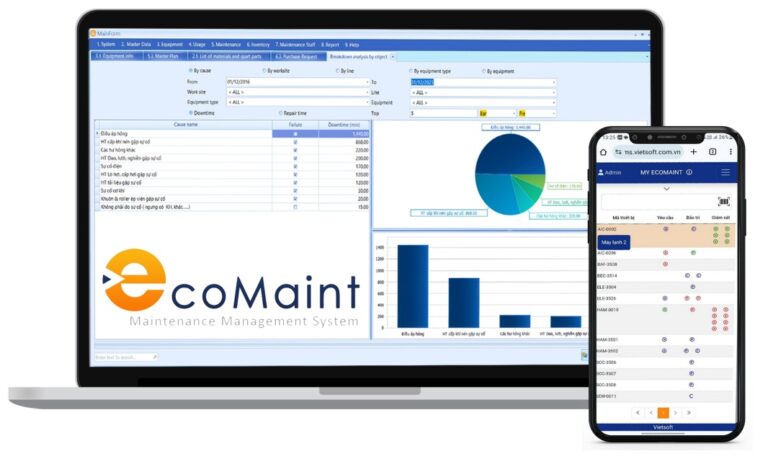
As an expert who’s guided countless Vietnamese businesses, Vietsoft recommend exploring CMMS EcoMaint — a Cloud-Based CMMS tailored for local needs. This solution offers real-time asset tracking, seamless scalability, and robust security, perfect for Vietnam’s industrial growth. Curious how it can transform your operations? Discover the CMMS EcoMaint solution here.
Contact us for consultation via hotline: 0986778578 or email: sales@vietsoft.com.vn.